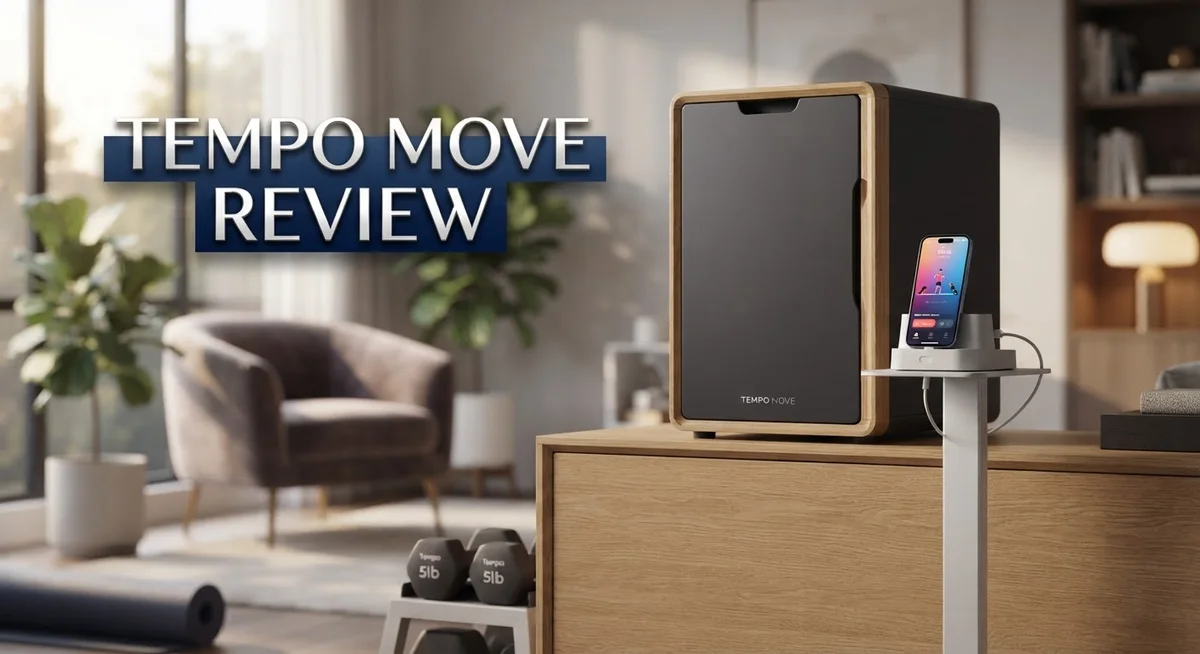
Tempo Move Review: iPhone-Powered Home Gym System?
Tempo Move turns your living room into a smart gym. It uses your iPhone and a 3D sensor to track your form. You get real time feedback while you train.
This system offers many workout styles. You can try weight training, HIIT, yoga, and boxing. The music and production quality keep classes fun and energetic.
But does Tempo Move really replace a gym? Some users love the variety. Others miss the warmth of a real coach.
We tested Tempo Move to see how it performs at home. This review covers setup, workout quality, and connectivity. We also compare it to rivals like Tonal 2 and NordicTrack Fusion.
Keep reading to see if Tempo Move fits your fitness goals. We break down the pros, the cons, and who should skip it. You will know exactly what to expect before you start your first class.
In a Nutshell
Tempo Move packs a lot into a small space. Here is what stands out most.
-
iPhone powered setup: Your phone becomes the brain of this system. It pairs with a 3D sensor to track your form in real time.
-
Needs room to move: You need at least 6 feet of clearance. Small apartments might feel tight.
-
Class variety shines: You get weight training, HIIT, yoga, and boxing. There is something for every mood.
-
Production feels polished: The music and video quality keep workouts fun. Many users enjoy the energy of each session.
-
Coaching falls flat for some: Instructors lack warmth. You may miss the encouragement found in other platforms.
-
Connection hiccups happen: Some users report connectivity issues during workouts. This can break your flow mid session.
-
Compact but limited: It is smaller than Tempo Studio. But some users eventually drift back to traditional gyms.
Tempo Move works best for people who want variety without bulky equipment. It may not suit those craving deep motivation or flawless tech performance.
System Setup and Space Requirements
Setting up Tempo Move is straightforward because your iPhone does most of the work. You download the app, connect your phone to your home WiFi, and position it in front of your workout space. The system uses your phone’s camera and 3D sensor to track your form in real time.
Space is the first thing to check. You need at least 6 feet of clearance in front of your phone. This means enough room to move your arms, step side to side, and perform lunges without hitting walls or furniture. A living room corner or cleared bedroom space works well. The compact footprint makes Tempo Move fit into smaller homes compared to larger home gym equipment.
Your TV becomes the display screen. You can mirror your iPhone to any smart TV you own, or use an Apple TV for wireless connection. This setup keeps your phone free for form tracking while showing classes on a bigger screen. The video quality stays sharp, and you see your coach clearly from across the room.
WiFi connection matters more than you might think. A strong, stable internet signal keeps the 3D sensor working smoothly. Some users report connection drops during workouts, so placing your router near your exercise area helps prevent interruptions. A wired connection through an Apple TV reduces WiFi dependency.
Lighting affects how well the camera tracks your movements. Natural light or a well lit room gives the best results. Dim spaces can confuse the sensor, making form feedback less accurate.
Setup takes about 15 minutes total. Download the app, create your account, pair your phone, and test your space. The app walks you through each step. Most people complete everything before their first workout.
Tempo Move works best in dedicated spaces where you can leave your phone mounted or positioned consistently. Shared spaces like living rooms are fine if you can clear them quickly. The real requirement is not fancy equipment or expensive upgrades. You just need open space, good light, and stable internet.

- 1 set. 5 Functions: No more buying dumbbells, kettlebells, barbells, push-up stands, and plates separately. This...
- Custom Weight for Every Routine: The dumbbell pieces feature a detachable design, and the adjustable weight range for...

Last update on 2026-10-27 / Affiliate links / Images from Amazon Product Advertising API
Workout Variety and Class Offerings
Tempo Move delivers a solid range of workout styles that keep things fresh week to week. You get weight training, HIIT, yoga, and boxing all in one system. This variety means you can switch gears based on your mood or fitness goal without hunting for a new app.
The class library feels well organized. Weight training classes break down proper form for common lifts. HIIT sessions push your cardio in short bursts. Yoga classes help with flexibility and recovery. Boxing workouts combine cardio with upper body engagement. Each style has multiple options, so you won’t repeat the same routine every day.
Production quality stands out as a real strength here. The music selections match the workout intensity. Video editing keeps things visually engaging. Instructors use clear cues during exercises. This polish makes sessions feel more like premium studio classes than typical home gym content.
However, coaching warmth becomes an issue for many users. Instructors deliver instructions but lack the encouragement and motivation that push you harder. You won’t get personalized shout outs or that fired up energy some people need. The form cues are present but less detailed compared to other smart home gym systems.
Class structure matters too. Each session flows from warm up through main work to cool down. This consistency helps your body prepare and recover properly. Time options range from quick 20 minute sessions to longer 45 minute classes.
One thing to note: users report high abandonment rates with Tempo Move. Some people find themselves gravitating back to traditional gyms despite having access to this variety. This suggests that workout variety alone doesn’t guarantee long term engagement for everyone.
The class variety definitely appeals to people who like options. You can hit different muscle groups throughout the week. You can mix cardio and strength training. You can even use yoga for active recovery days. This flexibility makes Tempo Move work well for users seeking diverse training styles without leaving home.
Form Tracking and AI Technology
Tempo Move uses your iPhone as the core of its form tracking system. The phone’s camera acts as a 3D sensor that watches your movements during every rep and set. This setup means you get real time feedback without needing expensive equipment mounted to your walls.
The AI technology analyzes your body position and movement patterns. It checks your alignment, range of motion, and exercise technique. The system compares what it sees to proper form standards. You get instant corrections when something looks off.
The 3D sensor works best in good lighting conditions. Shadows or dim rooms can confuse the camera. Natural light or bright workout spaces give you the most accurate tracking. The system needs that 6 feet of clearance in front of your phone to see your full body.
Your TV displays the workout class and form feedback side by side. Coaches appear on screen while the AI overlay shows your body position. This dual display helps you understand what adjustments you need to make. The visual feedback makes corrections feel less abstract.
One challenge with this approach is connectivity stability. The AI processing requires a strong WiFi signal. Users report occasional connection drops during workouts. These interruptions can break your flow and frustrate your session.
The AI technology also tracks your workout history and progress. The system remembers your previous weights, reps, and performance. Over time, it learns your fitness level and suggests appropriate loads. This personalization helps you push yourself safely.
However, the form tracking has limitations compared to some competitors. The coaches provide less detailed instruction about proper technique. Many users report they want more guidance about why certain adjustments matter. The AI catches form issues but doesn’t always explain the reasoning behind the corrections.
The technology feels reliable for basic form checking. It works well for compound movements like squats and deadlifts. More complex exercises sometimes get missed or misinterpreted. The system performs better with standard movements than with unusual variations.
Top 3 Alternatives
Apple Watch Series

- STAY CLOSER TO YOUR HEART HEALTH—The most accurate heart rate sensing in a wearable,* Series 12 now measures HRV as...
- A FULL-FEATURED HEALTH TRACKER—Better understand your body with invaluable health insights. View your overnight health...
Last update on 2026-10-27 / Affiliate links / Images from Amazon Product Advertising API
The Apple Watch Series offers comprehensive fitness tracking right on your wrist. It monitors your heart rate, tracks workouts, and logs daily activity rings. The device syncs seamlessly with your iPhone and other Apple devices.
You get access to the Fitness app, which shows your progress over time. The watch displays notifications, lets you respond to messages, and plays music. Battery life typically lasts all day with regular use.
Garmin Forerunner

- Easy-to-use running smartwatch with built-in GPS for pace/distance and wrist-based heart rate; brilliant AMOLED...
- Up to 11 days of battery life in smartwatch mode and up to 19 hours in GPS mode
Last update on 2026-10-27 / Affiliate links / Images from Amazon Product Advertising API
Garmin Forerunner watches focus on serious athletic performance. These devices provide detailed running metrics like cadence, stride length, and ground contact time. They track multiple sport modes and offer GPS navigation for outdoor activities.
The watches display training load, recovery time, and VO2 max estimates. You can set up custom workouts and follow coaching plans directly on the device. Garmin’s battery life often extends several days, making it ideal for extended training sessions.
Fitbit Sense

- 1.59in l x 1.59in w x 0.49in h. ECG, stress sensing and a skin temperature sensor. Get notifications for calls, texts...
- Compatibility: Apple iOS 12.2 or higher, Android OS 7.0 or higher, Syncing range: Up to 30ft, Music control via...
Last update on 2026-10-27 / Affiliate links / Images from Amazon Product Advertising API
Fitbit Sense emphasizes health insights and wellness monitoring. It tracks heart rate variability, skin temperature, and stress levels throughout your day. The device also monitors sleep quality and provides sleep scores.
Fitbit Sense offers guided breathing sessions and mindfulness features. It tracks steps, calories, and active minutes like standard fitness trackers. The watch connects to the Fitbit app, where you can view detailed health reports and set personal goals.
Each option serves different needs. Apple Watch works best if you want ecosystem integration. Garmin suits runners and athletes seeking advanced performance data. Fitbit focuses on overall wellness and health metrics.
Coaching Quality and User Engagement
The coaching experience with Tempo Move presents a mixed picture that directly impacts how long users stick with the platform. Coaches deliver clear workout instructions, but they often lack the warmth and personal connection that keeps people motivated. You won’t hear much encouragement or personalized feedback during your sessions. This matters because motivation drives consistency, and consistency drives results.
The production quality compensates somewhat for the coaching gaps. Music selection feels energetic and well matched to each workout style. The video production itself looks polished and professional. These elements create an engaging atmosphere that helps offset the less enthusiastic coaching presence.
User engagement tells an important story here. Tempo Move reports notably high abandonment rates compared to traditional gym experiences. Many people start strong but gradually return to in-person workouts. This suggests the system excels at attracting users initially through its diverse class variety but struggles to maintain long-term engagement. The lack of coach motivation likely contributes to this pattern.
The class structure itself supports engagement in some ways. Workouts span weight training, HIIT, yoga, and boxing. This variety appeals to people who enjoy switching between different training styles. You can find something that matches your mood on any given day. The well-organized class library makes browsing and selecting workouts straightforward.
However, the coaching gaps become more obvious as you progress. Experienced lifters notice that instructors provide less detailed form cues than competitors offer. Beginners might miss the encouragement that helps them push through difficult sets. The system focuses more on delivering workouts than building a supportive community around them.
Engagement ultimately depends on your preferences. If you thrive with structured classes and diverse options, Tempo Move delivers. If you need personal motivation and detailed coaching feedback, you’ll likely find yourself frustrated. The platform works best for self-motivated users who can push themselves without constant encouragement. For others, the high abandonment rates suggest you might feel disconnected over time.
Connectivity and Technical Performance
Tempo Move relies on your iPhone and a strong WiFi connection to power its form tracking system. The connection quality directly affects how well the AI analyzes your movements in real time.
WiFi stability matters most here. Your phone needs a consistent signal to communicate with Tempo’s servers. If your WiFi drops or weakens, you’ll notice lag in the form feedback. The system processes your body position data constantly during workouts, so interruptions can break the experience.
The 3D sensor built into your iPhone works best when positioned correctly. Mount your phone at chest height, about 6 to 8 feet away from where you exercise. Poor placement or unstable phone positioning can reduce tracking accuracy. The camera needs a clear view of your entire body to function properly.
Lighting conditions impact connectivity performance too. Bright, natural light helps the system see you clearly. Shadows or dim rooms can confuse the camera and slow down the AI processing. This means your WiFi connection has to work harder to compensate for unclear video data.
Your TV displays both the workout class and form feedback simultaneously. This split screen setup requires your phone to send video data to your TV while also streaming the class content. Multiple data streams running at once can strain a weaker connection.
Users report occasional connectivity hiccups, particularly during peak usage times. Some people experience delays in form feedback or brief disconnections mid workout. These issues tend to happen less in homes with strong WiFi coverage throughout the exercise space.
The technical setup feels straightforward for most users. You pair your phone, position it correctly, and maintain good WiFi strength. However, older routers or homes with thick walls between your phone and router may struggle.
Reliability improves when you dedicate space to Tempo Move. Keeping your phone mounted in the same spot and maintaining consistent WiFi coverage reduces technical problems. The system works well for basic form checking once connectivity stabilizes, but it’s not immune to the WiFi challenges that affect any phone based fitness system.
Pros and Cons
Pros
- Offers diverse class types including weight training, HIIT, yoga, and boxing so you find workouts you enjoy
- Production quality and music selection keep sessions engaging and fun
- More compact design means it fits into smaller spaces compared to Tempo Studio
- iPhone powered system works with your existing TV for easy setup
- Form tracking via 3D sensor helps you check your movement on basic exercises like squats and deadlifts
Cons
- WiFi connectivity issues pop up regularly, especially during busy times when many people exercise
- Coaches deliver instruction without much warmth or motivational energy to keep you going
- Form feedback lacks detail compared to what other smart home gyms provide
- High abandonment rates suggest many users eventually return to traditional gyms instead
Who Should Buy It
Tempo Move works best for people who want a flexible home gym setup without major installation. If you have limited space, this system fits into smaller rooms where Tempo Studio would feel cramped.
You should consider Tempo Move if you enjoy variety in workouts. The platform offers weight training, HIIT, yoga, and boxing classes. This mix keeps things fresh and prevents boredom from repetitive routines.
Tempo Move appeals to iPhone users who already have a TV at home. You skip the need for expensive equipment installations. Your existing devices power the entire experience, which simplifies setup significantly.
This system suits people who value production quality. The music selection and class production feel polished and engaging. If you respond well to high energy sessions with strong soundtracks, you’ll likely enjoy what Tempo Move delivers.
Tempo Move works for beginners exploring fitness at home. The form tracking via 3D sensor helps you check basic movements like squats and deadlifts. You get real time feedback on your form without hiring a personal trainer.
However, Tempo Move is NOT ideal if you need constant coaching motivation. The coaches provide instruction but lack warmth and encouragement. If you rely heavily on a coach’s energy to push through tough workouts, you might feel disconnected.
Skip Tempo Move if you demand rock solid WiFi reliability. Connectivity issues pop up regularly, especially during peak usage times. You need a strong, stable internet connection for the system to work properly.
Tempo Move may disappoint people seeking detailed form instruction. Coaches offer less information compared to other smart home gyms. If you want extensive cues on every movement, you’ll find this lacking.
Avoid Tempo Move if you prefer traditional gym environments. User data shows high abandonment rates because many people ultimately prefer in person training. If you suspect you’ll miss the gym atmosphere, reconsider this purchase.
Tempo Move fits your life if you want a compact, variety focused home gym with solid production quality. You should pass if connectivity issues bother you or if you need strong coaching motivation to stay consistent.
Final Verdict
Tempo Move brings fresh energy to home workouts. It combines smart technology with real fitness variety. Still, it has some rough edges worth weighing.
The system shines when you want flexible training without heavy equipment. Your iPhone and TV handle most of the setup. This makes Tempo Move a smart pick for small apartments or shared living spaces.
However, this product leans more toward casual exercisers. People who need strong accountability or detailed coaching might feel let down. The lack of warmth from instructors stands out as a real gap.
Tonal 2 remains the stronger choice for serious strength training. It offers deeper feedback and a more premium feel overall. If you want a true gym replacement, that system edges ahead.
Tempo Studio Suite gives you free weights and a bigger footprint. Choose that option if space is not a concern. It also suits users wanting more traditional strength building tools.
For those who want simplicity, Tempo Move still earns its place. It works best as a stepping stone into home fitness. Beginners and casual users will likely enjoy the class variety most.
Think about your fitness goals before you decide. Do you need constant motivation? Then look elsewhere. Do you just want fun, varied workouts? Tempo Move fits that need well.
Connectivity hiccups and inconsistent coaching hold this product back from greatness. Yet the core idea stays strong. A compact, smart home gym experience through your phone is genuinely convenient.
In short, Tempo Move works best as an entry point. It is not the top performer in its class. But it still offers real value for the right kind of user.
If you crave structure and detailed feedback, explore Tonal 2 or FORME Life Studio Lift instead. For everyone else craving variety and simplicity, Tempo Move earns a cautious recommendation.
Frequently Asked Questions
Does Tempo Move work with any TV?
Tempo Move connects to your existing TV through your iPhone. You need a compatible iPhone and a TV with HDMI or AirPlay capability. The system doesn’t require a special smart TV. Most modern televisions work fine with this setup.
What space do I need for Tempo Move?
You need at least 6 feet of clearance in front of the 3D sensor. This space lets the camera track your form accurately during exercises. A small bedroom or living room corner works well. The compact design fits into tight spaces better than larger home gym equipment.
How accurate is the form tracking?
The 3D sensor monitors basic movements like squats and deadlifts. It catches major form mistakes and gives real time feedback. However, form instruction feels less detailed compared to some competitors. The tracking works best for fundamental exercises rather than complex movements.
Will I have WiFi problems?
Yes. Connectivity issues pop up regularly, especially when many people exercise at the same time. You may experience dropped connections or lag during classes. A strong home WiFi network helps, but problems still occur. This is a known limitation of the system.
Is Tempo Move good for beginners?
Absolutely. The diverse class options include weight training, HIIT, yoga, and boxing. Beginners appreciate the flexible approach and polished production quality. The music and class energy feel engaging. However, coaches lack warmth and motivational encouragement, so you’ll need self motivation to stay consistent.

DK is a passionate wellness advocate and product reviewer dedicated to helping readers make informed decisions about health-enhancing tools and devices. With a keen eye for quality and functionality, DK provides honest, thorough reviews and comparisons to support your journey toward better living.